

About
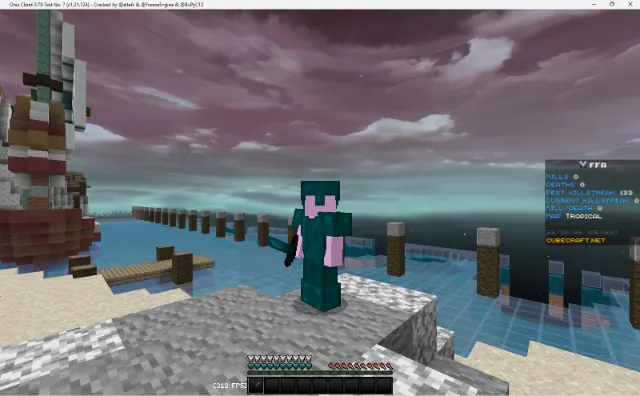
Eziak 500 is a PvP texture pack by eziak, made for a subscriber milestone, shown here with teal armour under a purple, cloudy sky on CubeCraft.
Packs named after a number like this are usually made when a creator's channel reaches that many subscribers, so Eziak 500 is eziak's own celebration pack.

The look
Teal armour stands out against most maps, which makes your own gear easy to recognise in a busy fight. The screenshot on this page is the best preview: it shows the teal armour and the sky in a real CubeCraft fight, which gives you a feel for the colours before you download.
What "private pack" means
eziak calls this a private pack folder. A private pack is one its maker first shared only with friends or a community before releasing it more widely, so these are packs you're less likely to have seen elsewhere. Apart from sleep, which has its own page, none of the nine files turn up in other folders on mcbepacks. The pack names guide explains private and other labels.
eziak's private pack folder
Eziak 500 is one of nine files in eziak's private pack folder from the video above:
- eziak 500 (22.8 MB)
- sleep (16.6 MB), which has its own page here
- SteeloWorld (41.7 MB), the biggest file
- WWYS (10.1 MB), DYInninside (9.0 MB), default eziak (8.6 MB) and Saturnn (8.5 MB)
- a tiny smalltools file and one more pack
The video
The video, from 30 October 2026, is under two minutes and shows the folder's packs in turn, with a short message from eziak to post what you create.
About the video
The video is called "The FINEST Pack Folder (Private Packs) [NEW]", and it's eziak's second private pack folder: the MediaFire folder is named "private pack folder #2". It runs under two minutes, and the description says just "post what you create", with the folder link underneath.
Downloading just this pack
The download button opens the whole folder on MediaFire, about 139 MB for everything, so pick eziak 500 from the list rather than downloading it all. Open the .mcpack and Minecraft imports it, then switch it on under Settings > Global Resources.
Step by step
- Open the MediaFire folder from this page.
- Find "eziak 500" in the list and download only that file, about 22.8 MB.
- Open it, and Minecraft imports it. On iPhone, use Share and pick Minecraft.
- Go to Settings > Global Resources and activate it.
Changing the sky
If you'd rather use a different sky, put a sky overlay above it in the list, since the pack higher in the list wins. Overlays like a crosshair or low fire go above it too. mwy's sky folder has twenty skies to choose from.
- 20+ Custom Sky Overlays | MCPE / MCBE by mwy
- sleep by eziak
What to look for
The teal armour is the pack's signature, so check how it looks against the maps you play on most, and whether players in other colours are still easy to pick out. The screenshot here is from CubeCraft, so if you play on The Hive, try it there before you decide.
Common questions
What does 500 mean? Packs named after a number are usually milestone packs, so Eziak 500 is most likely eziak's 500-subscriber pack.
Is it only for CubeCraft? No. The screenshot is from CubeCraft, but it works on any server that lets you use your own packs, and in your own worlds.
Can I get the other packs too? Yes. They're all in the same folder, about 139 MB in total, and sleep has its own page here.
Does it turn off achievements? No. It's a resource pack, and resource packs don't affect achievements.
Made for Bedrock 1.21.130 and newer on Windows, Android and iOS. All credit goes to eziak.
Screenshots
Works on Minecraft Bedrock 1.21.130 to 26.63.
Tags: PvP, PvP
Guides
- How to install texture packs on Minecraft Bedrock
- How to use texture packs on Xbox, PlayStation and Switch
More texture packs
- Top 10 ESSENTIAL Minecraft Bedrock Texture/Resource Packs! by IcyNutella
- まだ青い by ไนลา อารินี
- the most godsent mcpe pvp pack folder | mcbe 1.21+ by PolrFlare
- Candycorn by insomniactedi
- sleep by eziak
- Blitz 2k by Blitz