

About
Made by eziak, sleep is a PvP texture pack with a desaturated block palette, so blocks have muted, softer colours that are easy on the eyes.

Why desaturated works
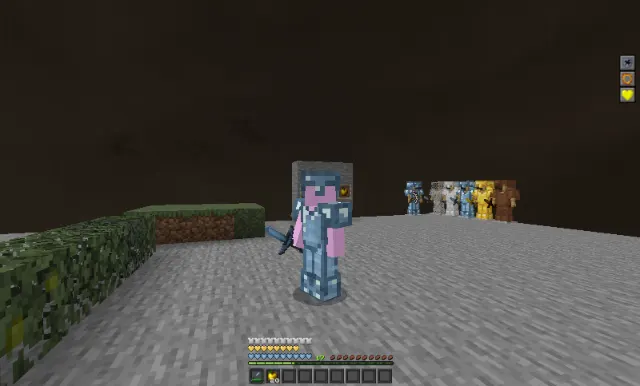
Desaturated packs turn the colour down on the world around you. That helps in PvP: with calmer blocks in the background, players and their armour stand out more. sleep pairs light blue armour and a matching sword with grey stone and a dark sky, which gives the whole pack a quiet, night-time feel.
The colours
In eziak's video, sleep is labelled on screen with light blue armour on grey stone. Paired with its muted blocks and a dark sky, that gives the whole pack a cool, quiet palette, so your gear stands out. If you like your armour to stand out against the world, that's exactly what a desaturated pack does.
When a calm pack helps
Calm packs suit long sessions, since muted colours are easy on the eyes. They also help on bright, busy maps, where strong colours everywhere can make it harder to pick out players. If your current pack feels loud, try sleep for a few games and see if fights feel easier to read.
Where it comes from
It's one of nine packs in eziak's private pack folder, alongside Eziak 500, which has its own page here, and packs like Saturnn, SteeloWorld and eziak's default edit. The video, from October 2026, is under two minutes and shows the folder's packs in turn.
- Eziak 500 by eziak
Downloading just this pack
The download button opens the whole folder on MediaFire, so pick sleep, about 16.6 MB, from the list rather than downloading everything. Open the .mcpack and Minecraft imports it, then switch it on under Settings > Global Resources.
Step by step
- Open the MediaFire folder from this page.
- Find "sleep" in the list and download only that file, about 16.6 MB.
- Open it, and Minecraft imports it. On iPhone, use Share and pick Minecraft.
- Go to Settings > Global Resources and activate it.
Adding colour back
If you like the muted look but want more colour on your gear, keep sleep as your main pack and add an overlay above it for your sword or armour. The pack higher in the list wins wherever two change the same texture. The overlays guide shows how.
Other calm packs
Futura is another desaturated pack here, with muted blues, and jze's Classic folder has a monochrome pack if you want to go further.
- Futura (Loafiverse 4k Pack) by loafiverse
- Hive CLASSIC Pack Folder by jze
What to look for
Play a few games on maps you know well. Check whether players in bright armour stand out more than they did with your old pack, and whether you can still tell blocks apart quickly when you're bridging, since muted colours bring some blocks closer together.
Common questions
What does desaturated mean? The colours are turned down, so blocks look softer and closer to grey than in vanilla.
Is sleep a private pack? It's in eziak's private pack folder, so it's one of the packs he first shared there.
Can I use it on The Hive? Yes. It's a resource pack, so it works on servers that let you use your own packs.
Does it turn off achievements? No. Resource packs don't affect achievements.
Made for Bedrock 1.21.130 and newer on Windows, Android and iOS. All credit goes to eziak.
Screenshots
Works on Minecraft Bedrock 1.21.130 to 26.63.
Tags: PvP, PvP
Guides
- How to install texture packs on Minecraft Bedrock
- How to use texture packs on Xbox, PlayStation and Switch
More texture packs
- Top 10 ESSENTIAL Minecraft Bedrock Texture/Resource Packs! by IcyNutella
- まだ青い by ไนลา อารินี
- the most godsent mcpe pvp pack folder | mcbe 1.21+ by PolrFlare
- Candycorn by insomniactedi
- Eziak 500 by eziak
- Blitz 2k by Blitz