

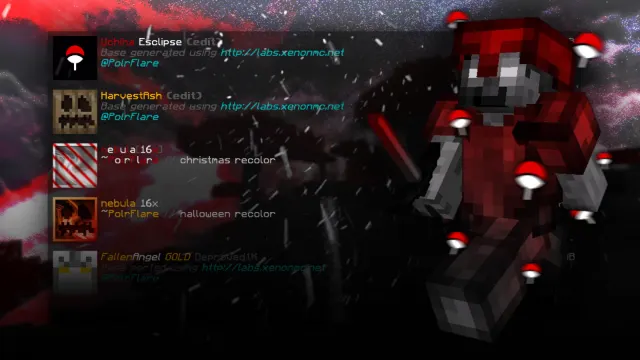
the most godsent mcpe pvp pack folder | mcbe 1.21+
About
PolrFlare's Hive PvP pack folder for Minecraft Bedrock 1.21 and newer: more than ten texture packs and shaders he uses for Hive Bedwars, Skywars and more.
The folder mixes custom recolours, anime-inspired edits and clean PvP packs, with resolutions from 16x up to 64x and high-definition packs. PolrFlare describes them as the packs he actually uses, which makes the folder a look at a real player's setup rather than a random list.

Pack by pack
In the order the video shows them, with how long each one gets:
- Nebula 16x Christmas recolour (0:00): about 18 seconds. A seasonal recolour of Nebula 16x.
- Uchiha Eclipse (0:18): about 35 seconds, the longest slot. A Naruto-inspired edit.
- Ms. Kocho (0:53): about 27 seconds. A Demon Slayer-inspired edit.
- Fallen Angel Deproved 1K (1:20): about 23 seconds.
- Fallen Angel Gold Deproved 1K (1:43): about 20 seconds. Going by its name, a gold version of the one before.
- Harvest Ash (2:03): about 21 seconds.
- Tales of the Citadel (2:24): about 29 seconds. A Rick and Morty-inspired edit.
- Nebula 16x Halloween recolour (2:53): about 32 seconds, running to the end.
Seasonal recolours
The two Nebula 16x recolours, one for Christmas and one for Halloween, are an easy way to match your pack to the season. The original Nebula 16x is in AptinYT's satisfying folder, along with two other Deproved packs, and Blitz's Spookiest folder has more Halloween packs.
- The Most SATISFYING Hive Pack Folder (20+ Packs, ft. Xenqr) by AptinYT
- The SPOOKIEST Hive Pack Folder (80+ Packs) by Blitz
Getting the packs
The download is on PolrFlare's Discord, linked on this page, rather than a direct file. Join the server, find the pack folder in the channel the video points to, and download the packs from there. Then open each .mcpack to import it into Minecraft, go to Settings > Global Resources and activate the pack you want. PolrFlare's Discord also runs pack requests and giveaways.
PolrFlare's install steps
The video description gives four steps, which match how any pack folder works:
- Download the folder from the Discord channel linked in the description.
- Open the .mcpack files to import them into Minecraft.
- Go to Settings > Global Resources and activate your pack.
- Join The Hive and play.
Consoles
PolrFlare's video says the packs work on Android, iOS and Windows, and also on Xbox, PlayStation and Switch with the install guide pinned in its comments. Consoles can't open .mcpack files directly, so playing with custom packs on a console means using a Realm or a world from another device. The console guide explains how.
Make your own
The video description also links XenonMC's pack generator, which makes customised PvP texture packs if none of these is quite right.
Resolution
Higher-resolution packs look sharper but need more memory, so on a phone, start with the 16x and 32x ones and only move up if your frame rate holds. The three-minute video shows the packs in Hive gameplay, so you can see how each one looks in a fight.
Common questions
Are the anime edits official? No. They're fan-made edits inspired by those shows, credited to their creators like every pack here.
What's Deproved? A pack name that turns up in several edits on the site, like Saber x Deproved and Deproved Ice in AptinYT's satisfying folder.
Do I need to join a Discord? Yes, for this folder. The download is in PolrFlare's Discord rather than on MediaFire.
Do they turn off achievements? No. They're resource packs, and resource packs don't affect achievements.
Staying safe on Discord
Pack servers are busy places, so it's worth being careful. Download only .mcpack, .mcaddon or .zip files from the channel the video points to, and ignore messages from strangers offering free packs or Nitro. A pack never needs you to run a program, so skip any file that ends in .exe or asks you to install something. The safety guide has more.
What to look for
Five of the eight are themed edits, based on anime, a cartoon or a season, so they're as much about style as fights. Try each one in a real game and check that enemy armour still stands out under the theme.
About the video
PolrFlare's video came out on 6 November 2026 and runs about three and a half minutes. Its description calls the folder the best Hive PvP pack folder for 2026, with clean, smooth, FPS-friendly packs for Bedwars, Skywars, Treasure Wars and scrims.
Pack credit goes to the original creators.
Screenshots
Works on Minecraft Bedrock 26.63.
Tags: PvP, Aesthetic, 16x, 32x, 64x, High resolution
Guides
- How to install texture packs on Minecraft Bedrock
- How to use texture packs on Xbox, PlayStation and Switch
More texture packs
- I Found the Perfect Minecraft Texture Pack... (MCPE 1.26+) by Icynutella
- まだ青い by ไนลา อารินี
- Candycorn by insomniactedi
- Aeecii 1K by Aeecii
- IcyNutella 40k Texture Pack Mashup Release by IcyNutella
- Odyssey 32x [Aeecii 2K] by Aeecii